You must Sign-in or Register to post messages in the Hobby Squawk community
Registration is FREE and only takes a few moments

Register now

Announcement

Collapse
No announcement yet.

Official 3DP Thread

Collapse
X
Collapse
First Prev Next Last
 
  • Filter
  • Time
  • Show
Clear All
new posts

  • RCjetdude
    replied
    Originally posted by Alpha.MotionRC View Post
    I'm very happy with my two Ender 3 printers. They consistently produce prints that rival other printers I've tried that cost 3x more. $15 of stepper motor dampers and an afternoon of printing free upgrades from Thingiverse, and they're printing like champs. I run both of them remotely, and they're networked with some of our other production partners for rapid prototyping.

    For 3D software, I recommend trying Fusion 360. It's powerful, intuitive, and, for you guys as hobbyists, it's free. There are lots of videos online to help people get started. It takes a weekend to learn the ropes. Take a day off from flying and pour it into Fusion 360, and you'll have the beginnings of a lifelong skill.


    Especially guys like you, RCjetdude, I can only imagine what kind of goodies you'd come up with if you worked in Fusion 360. I have a keypad next to my mouse, and it's as simple as a shortkey plus a value in the keypad for dimensions.
    I have Fusion 360 as well and what I have tried I have managed to work through. It can do sooo much! I recently made some X-Vert motors mounts for a young man we fly with who broke one of his. He gave me the good one as a pattern to go by and they turned out pretty good. I felt mildly accomplished on that one. I have tried some basic tutorials online. I need to do like you said and just dive in one weekend. Do you recommend any particular videos? I would love to do more with it for my F-117 project. I also use Simplify 3D for my slicer.

    Leave a comment:


  • Elbee
    replied
    Originally posted by RCjetdude View Post
    I takes TIME to learn 3D CAD software....something I find in short commodity lately. :(
    RCJD, Copy that. Best, LB

    Leave a comment:


  • Alpha
    replied
    I'm very happy with my two Ender 3 printers. They consistently produce prints that rival other printers I've tried that cost 3x more. $15 of stepper motor dampers and an afternoon of printing free upgrades from Thingiverse, and they're printing like champs. I run both of them remotely, and they're networked with some of our other production partners for rapid prototyping.

    For 3D software, I recommend trying Fusion 360. It's powerful, intuitive, and, for you guys as hobbyists, it's free. There are lots of videos online to help people get started. It takes a weekend to learn the ropes. Take a day off from flying and pour it into Fusion 360, and you'll have the beginnings of a lifelong skill.


    Especially guys like you, RCjetdude, I can only imagine what kind of goodies you'd come up with if you worked in Fusion 360. I have a keypad next to my mouse, and it's as simple as a shortkey plus a value in the keypad for dimensions.

    Leave a comment:


  • RCjetdude
    replied
    I takes TIME to learn 3D CAD software....something I find in short commodity lately. :(

    Leave a comment:


  • Elbee
    replied
    Originally posted by Rcfiddy1 View Post
    I actually ordered a mk3 but after waiting 3 months they still didn’t ship I canceled it. I decided to upgrade my p3 steel with a duet WiFi controller and e3d titan extruder. Now that printer prints amazing next to my Kossel delta. There are a few guys here in the forums that do amazing work with 3D parts and I look forward to helping out here.
    RcF, Yes, I had a similar thought about 60 days after ordering my Prusa kit. I had hoped this forum could be a great thread to share files and user knowledge. Perhaps with your experience and that of others, we could make this a better source for those who have 3D printers or want to get into 3DP. Most parts I have made are simply arranging basic shapes, but guys like DirtyDee have shown me how much I need to learn. I love designing/printing a part that used to take me a half a day to construct out of bits and pieces I had laying around. Great to have you onboard. Best, LB

    Leave a comment:


  • Rcfiddy1
    replied
    I actually ordered a mk3 but after waiting 3 months they still didn’t ship I cancelled it. I decided to upgrade my p3 steel with a duet WiFi controller and e3d titan extruder. Now that printer prints amazing next to my Kossel delta. There are a few guys here in the forums that do amazing work with 3D parts and I look forward to helping out here.

    Leave a comment:


  • Elbee
    replied
    Originally posted by Rcfiddy1 View Post

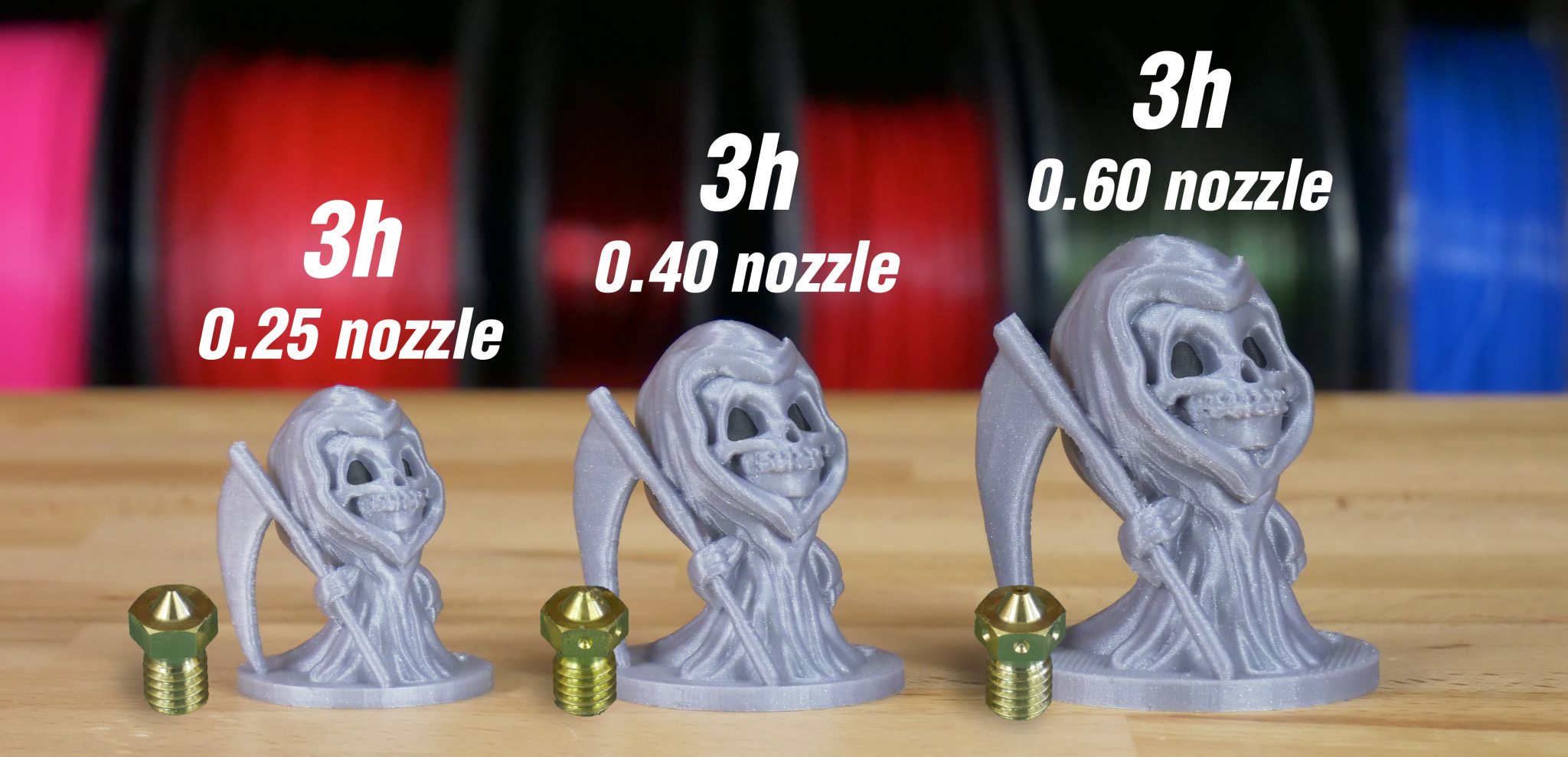
    You can also setup different processes in simplify3d to allow different heights or use lower infill settings to speed up some. I think anything larger than a .40 nozzle makes prints look to rough. I run one of my printers with a .25 nozzle for high detail stuff.
    RcFiddy1, Thanks for the advice, and I am glad to see someone still uses this thread. Wish more would share here. I have changed the 'infill settings' and that has worked well enough. I have not used Simplify3D, but I might try it. I have a Prusa i3Mk3 and use slic3r as it was part of the overall purchase. Best, LB

    Leave a comment:


  • Rcfiddy1
    replied
    Originally posted by Elbee View Post
    Hey Y'all, Have any of you tried increasing the nozzle size to decrease print times? I understand that some weight penalties would be incurred. Also, is anyone using or thinking about picking up a 3D Scanner? Any thoughts here would be geat. Just curious, :Thinking: Best, LB
    You can also setup different processes in simplify3d to allow different heights or use lower infill settings to speed up some. I think anything larger than a .40 nozzle makes prints look to rough. I run one of my printers with a .25 nozzle for high detail stuff.

    Leave a comment:


  • Alpha
    replied
    Originally posted by dblmars View Post
    To Alpha, and the MTNRC Design Staff,
    I have a suggestion for an alternate Tail-feathers for the 1600mm Spitfire... it allows for the retention of the original hing points, and control horn while providing the full outline of the teardrop rudder profile...
    Hey Dblmars, looks great! Please ping me in PM to discuss.

    Leave a comment:


  • rifleman_btx
    replied
    Very cool!

    Leave a comment:


  • TSHobbies
    replied
    hey check it out..wheel chocks!
    Wheel chocks for RC planes. These fit 114 mm/4,5" wheels. Scale up or down as necessary.

    Leave a comment:


  • TSHobbies
    replied
    for those of you needing pilots, heres some pretty good ones ..not mine, just found em while searchin for cool stuff to print.
    27 3D print models, available for download in STL, OBJ and other file formats, ready for printing with FDM, SLS and other 3D printers.

    Leave a comment:


  • Elbee
    replied
    Originally posted by Dirty Dee View Post
    Here is a good article talking about different nozzle sizes. Your print settings with infill and perimeters can be tweaked to minimize weight impact, so the biggest trade-off with larger nozzles is lower resolution (if you go with larger layer heights)]
    DD, Thank you, coincidentally this is the article I read that caused me to ask the question. Go figure. Best to you, LB

    Leave a comment:


  • Dirty Dee
    replied
    Here is a good article talking about different nozzle sizes. Your print settings with infill and perimeters can be tweaked to minimize weight impact, so the biggest trade-off with larger nozzles is lower resolution (if you go with larger layer heights)

    The default nozzle diameter for most of today's printers is 0.4 mm, and the nozzles used in Original Prusa i3 MK3S+ and the MINI printers are no exception. Changing the nozzle takes just a few minutes and it can bring a...

    Leave a comment:


  • Elbee
    replied
    Hey Y'all, Have any of you tried increasing the nozzle size to decrease print times? I understand that some weight penalties would be incurred. Also, is anyone using or thinking about picking up a 3D Scanner? Any thoughts here would be geat. Just curious, :Thinking: Best, LB

    Leave a comment:


  • dblmars
    replied
    I am interested in the 3D parts for the 1600mm Spitfire Cockpit set, and had some concerns about their design and dimensions as I would like to upgrade my spit with the new instrument panel... Attached are images of the outline of the stock instrument panel which fits within my Spitfire's cockpit and a valid representation of a scale Mk IX instrument panel. The stock instrument panel truncates significant portions of a the scale instrument panel, and from what I observed from the promo video https://www.youtube.com/watch?v=TOfTBBN08_8 the new 3Dprints will do the same... Now I realize that this Spitfire is semi-scale, but could we get somewhat closer to scale? Thanks to all of Motion RC and Flight Line RC for providing the hobby with their superb product lines.

    Leave a comment:


  • Aros
    replied
    Originally posted by radfordc View Post
    Here is my 3D printed Corsair. Flys great.
    Wow that is sweet!! Surface looks smooth too! What size? Are you taking orders? LOL

    Leave a comment:


  • Hardway
    replied
    Wow!!! That is too cool!!! Great job!

    Leave a comment:


  • radfordc
    replied
    Here is my 3D printed Corsair. Flys great. Click image for larger version

Name:	Corsair 1.jpg
Views:	541
Size:	346.2 KB
ID:	138210

    Leave a comment:


  • Elbee
    replied
    Thank you, Gentlemen. Gotta love Amazon Prime. Tamm's favorite buyers' club LOL. Looking forward to building DD's ordinance package and I will try the F4 cockpit after that, Woohoo, I'm havin' some fun now. I think my first design attempt will be intakes and splitters for the Double Ugly. A break in the wind here for the next few days, soooo maybe the 1st check flight with the A-10 yet this week. Best, as always, LB

    Leave a comment:

Working...
X