



was always going too fly my corsair off a beach cliff ,,,saw carbon z cessna vid like that
on u tube////// very cool
-
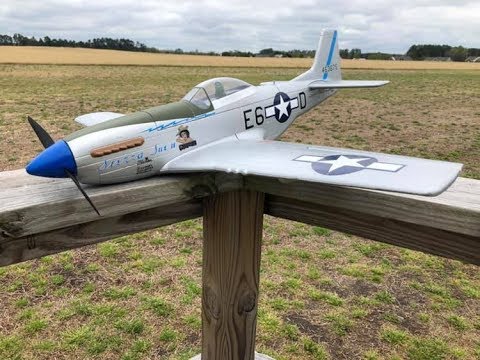
Took my FL Mustang to the ocean last week...LOVED the ocean air and wide open space! Had a great flight. Unfortunately I forgot the proper XT60 adapter for the charger so I was only able to get one flight in but it was awesome.
Leave a comment:
-
Hi dose anybody know when these bad boys are coming back in stock. Hey plasticsqaudron ,I use the tape you use for air fix models . I tape the edges and cover the rest of the plane with news paper, that works well for meLeave a comment:
-
Welcome to Hobby Squawk! For the tight lines I use painter's tape..Frog tape specifically. Rub it a bit on your pant leg to take off some of the adhesive which helps it not pull up the paint. There are all kinds of methods...Some use newspaper, some use post it notes...Waterslide decals can be applied by placing the decals in a bowl of water for about 2-to-3 minutes...Then it slides easily off the paper on to the surface. Make sure the surface area has a little moisture, that way you can still slide it around until you have the desired placement. Then I dab it lightly with a paper towel. There are many methods to painting and decals...These are what work for me. Good luck!Originally posted by Plaztiksquadron View PostLeave a comment:
-
Newbie here...to painting and decaling that is....how do you all get such tight lines when painting and how do you apply the waterslide decals?...am assuming Solvaset is out of the question?Leave a comment:
-
Hi hope I haven’t explained myself so badly that I have put you all off. If anyone can help with how I’ve set my transmitter up that would be great thanks mikeLeave a comment:
-
Hi alpha, thanks for the help .l think I got myself into a bit of a mess. I have reset the dx6i, I’ve created a new model as you suggested with no mixes. I got d/r+expo set at , aile@ 90 expo @ 35+ , elev@75expo@35 , this is high rates. On low rates I’ve got aile at 75 expo @35 ,elev @ 55@ expo @35 . Low and high rates all working on al-dr switch. I bind
transmitter to Plane and all seems good, let me know what you think thanks mikeLeave a comment:
-
Hi Window Man, you shouldn't have any mixes in this model. Create a New Model, select Model Type, select Airplane. For Wing Type, select 1 AIL.
Also, for your rates, double-check if you're using positive expo or negative expo. With Spektrum radios like your DX6i, you want positive values, not negative values. Also, your expo is far too high. I strongly recommend trying high/mid/low expo in the range of 40/30/25. The way expo works, an expo value of greater than +50 can make a model like this feel very jumpy. Some like it, but most pilots fly in the +20 to +35 range, give or take 5.Leave a comment:
-
Hi yes I have created a new model for the p51 I have set the low rates to the al switch. The high rates are, aile 100 expo 70 .elev 100 -expo70, low rates aile 75 expo 70 elve 55 expo 70 . I will catch up later on my way to work thanks mikeLeave a comment:
-
, Hi thanks for the response from everybody, I do have it set up as the manual says. I think my problem is with the dx6i the settings I have for the p51 are, mix 1 elivator to elivator , sw on , trim act, mix 2 aile to aile sw on trim act.wingtailmix ,dualaile ,inh v-tail , inh elivon,inh i think these are right. Any help would be much appreciated , thanks mikeLeave a comment:
-
Welcome to Hobby Squawk W M !!! Glad you are here!!! I have not flown mine yet, so I have no useful advice at this time.... ;) JerryLeave a comment:
-
Hey Window Man, welcome to Hobby Squawk! You'll find the group here eager to help. Let us know what your settings are and we can start from there. Since you're flying the Opterra, I want to clarify that you created a new model in your radio and set the Wing Type correctly. For the P-51, you want single elevator, normal tail.
Once your radio settings are correct, we can evaluate if your battery is in the correct position and your hand launch sequence is correct (throttle, launch speed and launch angle, etc).
Don't worry, you'll be flying safely soon.Leave a comment:
-
Hi Mike welcome to Hobby Squawk!
Would love to help...What exactly is the problem? Have you set the model up based on the manufacturer's recommendations as far as rates/throws/CG?Leave a comment:
-
Hi hope someone can help,i am a bit of a newbie, I have the opera 2meter , which I can fly okay. The problem is I have just got a dx6i , l have set up to the opera ok , but I seem to be having problems setting it to the p51 . To the point we’re I had a pritty bad nose dive, and smashed the nose in. I have managed to put it back together, but a bit nervous of trying it again. I was hoping someone can help me with the right settings any help would be great thanks mike,ps l like what everyone is doing with their p51Leave a comment:
-
LOL
Yeah she goes bonkers over my planes...She is tenacious, never gives up even though it's obvious she will never catch one!Leave a comment:



Leave a comment: